
Learn how to take better product photos that attract buyers and help your listings sell faster. Discover simple photography tips for electronics, furniture, books, fashion, watches, and more.
How to Take Photos That Sell Your Product Faster | 15 Easy Tips
Most buyers don’t read your description first. They look at your photos.
Imagine you’re scrolling through hundreds of listings.
Two people are selling the exact same chair.
One photo is dark, blurry, and taken in a messy room.
The other is bright, clean, and shows every angle.
Which one would you click?
Probably the second one.
That’s because people don’t buy products online first.
They buy confidence.
Good photos build trust before a single message is exchanged.
Whether you’re selling a phone, bicycle, books, furniture, fashion, electronics, or collectibles, your photos are your first impression.
And first impressions sell.
Why Product Photos Matter More Than Price
Many sellers think lowering the price is the fastest way to sell.
Not always.
A well-photographed product often sells faster—even if it’s slightly more expensive—because buyers can clearly see what they’re getting.
Think of your listing as a shop window.
If the window is attractive, people walk in.
If it looks neglected, they keep scrolling.
1. Clean the Product First
It sounds obvious, but it’s one of the most overlooked steps.
Dust.
Fingerprints.
Smudges.
Pet hair.
Wrinkles.
Spend five minutes cleaning the item.
It can make a huge difference.
2. Use Natural Light
How to Take Photos That Sell Your Product Faster | 15 Easy Tips
You don’t need an expensive camera.
A smartphone and daylight are often enough.
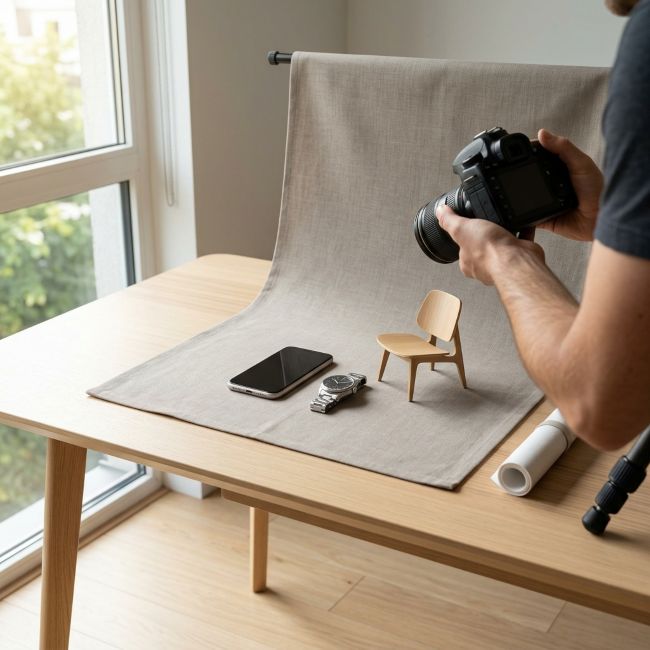
Take photos near a large window or outside in soft morning or evening light.
Avoid harsh midday sunlight that creates strong shadows.
Natural light shows colours more accurately and makes products look more appealing.
3. Choose a Simple Background
The product should be the hero.
Not the laundry basket.
Not yesterday’s dishes.
Not your television.
Use:
✔ A plain wall
✔ A clean table
✔ A wooden floor
✔ A neutral bedsheet
A clutter-free background helps buyers focus on the item.
4. Show Every Angle
One photo isn’t enough.
Imagine buying a used phone with only one picture of the front.
You’d have questions.
Take photos from:
- Front
- Back
- Left
- Right
- Top
- Bottom
- Close-ups
The more information your photos provide, the fewer questions buyers need to ask.
5. Be Honest About Damage
Small scratches.
Tiny dents.
Loose stitching.
Don’t hide them.
Show them clearly.
Surprisingly, honest listings often build more trust than “perfect” ones.
Most buyers don’t expect a pre-owned product to be flawless.
They expect honesty.
6. Include Accessories
Selling a camera?
Photograph:
Lens
Battery
Charger
Bag
Manual
Original box
People like knowing exactly what they’re getting.
7. Show Scale
Sometimes buyers can’t judge size.
Include something familiar nearby.
A notebook.
A chair.
A hand.
This gives perspective without needing measurements.
8. Stage the Product
Lifestyle photos help buyers imagine ownership.
Instead of placing a chair against a wall…
Show it beside a study desk.
Instead of photographing a bicycle in storage…
Take it outside.
Instead of laying books in a pile…
Arrange them neatly on a shelf.
People buy stories, not just objects.
9. Keep the Camera Steady
Blurry photos reduce trust.
Rest your elbows.
Use both hands.
Or place your phone on a stable surface.
Sharp photos always perform better.
10. Don’t Overuse Filters
Buyers want to know what they’ll actually receive.
Heavy editing changes colours and creates unrealistic expectations.
Keep adjustments minimal.
11. Photograph Important Details
If you’re selling:
Electronics
Show:
Screen
Ports
Battery health (if available)
Storage information
Serial label (hide sensitive numbers)
Furniture
Show:
Corners
Legs
Fabric
Wood grain
Any scratches
Watches
Show:
Front
Back
Strap
Buckle
Dial
Close-up of the condition
Books
Show:
Cover
Spine
Pages
Any highlighting or damage
12. Take Photos Horizontally and Vertically
Different platforms display images differently.
Having both orientations gives you flexibility.
13. Use High Resolution
Avoid screenshots.
Avoid blurry zoomed-in images.
Modern smartphones capture excellent quality.
Use them.
14. Write a Description That Matches the Photos
Never let your photos say one thing and your description another.
If there is a scratch…
Mention it.
If a charger is missing…
Mention it.
Transparency creates confidence.
15. Think Like the Buyer
Before posting, ask yourself:
If I saw this listing…
Would I trust it?
Would I have questions?
Would I contact the seller?
If the answer is yes, improve the photos first.
The Biggest Mistake Sellers Make
Many people take photos only after deciding to sell.
Instead, build a habit of taking care of your products while you own them.
Keep original boxes.
Save receipts if possible.
Store accessories together.
Well-maintained items with complete accessories usually attract more buyers and often sell for better prices.
Good Photos Don’t Just Sell Products—They Save Time
Clear photos reduce unnecessary questions like:
“Is it scratched?”
“Does it come with the charger?”
“What’s the condition?”
“Can you send more pictures?”
The better your listing, the smoother the conversation.
Selling Smarter with ZiHERO
Whether you’re selling a used phone, bicycle, furniture, books, fitness equipment, or a watch, good photos help buyers feel confident before they even message you.
On ZiHERO, where people connect locally to buy and sell, clear and honest listings can lead to faster conversations, smoother meetups, and a better experience for both buyers and sellers.
Sometimes the quickest way to sell isn’t lowering your price.
It’s simply taking better photos.
Frequently Asked Questions (FAQs)
What is the best lighting for product photography?
Natural daylight near a window or outdoors during the morning or late afternoon usually provides the most accurate colours and soft shadows.
Can I use my smartphone to take product photos?
Yes. Most modern smartphones are capable of taking high-quality product photos without professional equipment.
How many photos should I upload?
Aim for at least 6–10 photos, covering different angles, close-ups, accessories, and any signs of wear.
Should I show scratches or damage?
Yes. Honest photos build trust and reduce disputes. Buyers appreciate transparency.
What background is best for selling products?
A clean, uncluttered background in neutral colours helps the product stand out.
Why are my listings not getting views?
Poor lighting, blurry photos, missing angles, unrealistic pricing, and incomplete descriptions are common reasons.
What products sell fastest with good photos?
Electronics, furniture, books, bicycles, fashion, watches, home décor, gaming consoles, musical instruments, and fitness equipment all benefit from clear, detailed photography.
Where can I sell used items online?
Trusted local marketplaces such as ZiHERO allow you to list products, connect with nearby buyers, and arrange convenient meetups.